Showing posts with label Assisstive Technologies. Show all posts

Friday, July 6, 2018

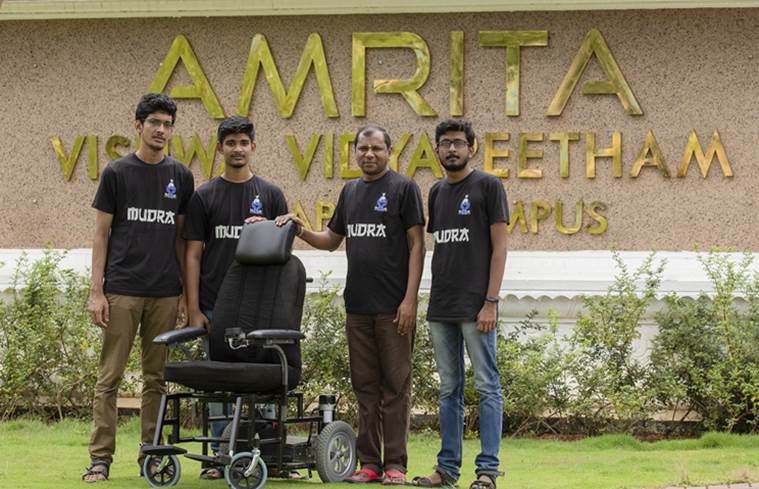
Self-E: INdia's first self driving wheelchair

Three final-year engineering students of Amritha Vishwa Vidyapeetham University in Coimbatore have developed a self-driving wheelchair called ‘Self-E’ with an autonomous navigation system which ensured easy travel of users from one place to another without user intervention. The Robotic Operating System (ROS) helps navigate automatically making it user-friendly. The user can touch any point on the generated map, and the wheelchair will drive to that place automatically navigating its own path and avoiding obstacles.


Read more here:
https://indianexpress.com/article/india/three-b-tech-students-in-tamil-nadu-develop-indias-first-self-driving-wheelchair-5245969/


and here:
https://qrius.com/students-in-coimbatore-develop-low-cost-self-driving-wheelchair-all-you-need-to-know/

Friday, June 8, 2018

Check this out!!


https://www.zdnet.com/article/ar-for-the-blind-brings-is-straight-out-of-star-trek/?ftag=TRE-03-10aaa6b&bhid=31824199


Both Google and Microsoft are working on major technological advances based on audio and also specifically for the VI. I am keeping fingers crossed and hoping it happens soonest.

Friday, April 1, 2016

E Book Reading App for Android - Free

Here is  a communication from Sparsh Products - sharing as received.

 Dear Friends,

  We are pleased to inform you that the ebook reading app "Accessible Reader"  is now being provided free of cost by Amway Opportunity Foundation. It is the world's only accessible ebook reading software with all the navigation features which is available free of cost and the rest are paid apps. Please   download the same from playstore. Given below is the link:


https://play.google.com/store/apps/details?id=com.AmwayOpportunityFoundation
  .accessiblereader


   The main features of the app are given below:
   1. Read your txt, rtf, doc, docx and pdf files with complete
  navigation.
  2. It Supports Hindi, English and many other languages. Just have the
  compatible TTS engine for the language and you can read the same. For
  example for Hindi you can use Google Hindi, Lekha or espeak tts & for
  English you can use eloquence or any other English tts engine.
  3. Change your navigation mode between word, sentence, paragraph and
  page.
  4. Go to the desired page instantly with the help of "go to page"
  option.
  5. Repeat command repeats the word, line, paragraph or page at which
  the current navigation is set to.
  6. Increase or decrease the reading speed instantly.
  7. Play/Pause button.
  8. Read All button. It would start the reading continuously.
  9. Status. It displays the percentage of the file you have read.
  10. Page. It displays on which page you currently are
  11. It keeps the history of last 10 files which you have opened and
  remembers the position on which you closed the file and would resume from
  the same place.
  12. It remembers the navigation mode, TTS engine and your reading speed
  which you were using for that particular file.
  13. Select the TTS engine and voice for that particular file before
  opening.
  14. The software is activated via internet. It supports deactivation
  also.
  15. If you wish to change your handset just deactivate the software and
  activate it again on another handset. The application will remain with you
  for lifetime.
  16. No adds

 In case of any query please do share with us.

  With regards,

 Abhinav

_ _ _ _ _ _ _ _ _ _ _ _ _ _ _ _
  Sparsh Products
  151-5, Rajpur Road, Jakhan Mandir,
  Dehradun 248001, India

  Mobile: 91-9837088334
  Email: info@sparshproducts.com

  sparshproducts@gmail.com

  www.sparshproducts.com <http://www.sparshproducts.com/>

 
www.sparshbraille.com <http://www.sparshproducts.com/>

Monday, March 18, 2013

Web Anywhere: A web based screen reader :)

Today, i heard about the most amazing thing - a web based screen reader that is absolutely pathbreaking!!! Its called WebAnywhere (WA).

Why is a web based screen reader revolutionary ?
Because it completely ELIMINATES  machine and software dependancy. Before WA, a blind person could only use their own machine to use personal computing. the screen reader needed to be installed on the machine.

But now, ANY machine can be used by a blind person. All they need to do is to click on the link and they're on!!

Happy Independence Day, Folks! We are free to use any machine we want from here on.

See the awesomeness here:
http://webanywhere.cs.washington.edu/beta/index.php